My Full Stack Development Learning Journey: Week 6 - Advanced JavaScript Concepts.

Hey everyone, in this week, I learned about the following JavaScript concepts:
Async/Await & Fetch API in JavaScript.
JavaScript try/catch & Error Handling.
Classes & Objects.
IIFE (Immediately Invoked Function Expressions).
Destructuring.
Spread Syntax.
Hoisting.
These are the steps I took to grasp the concepts:
1️⃣ Practiced Async/Await & Fetch API:
Understood how
asyncfunctions work and how they simplify promise chaining.Learned that
awaitpauses the execution of the async function until the promise is resolved, making the code easier to read and write compared to.then()chains.Used the
fetch()method to make API calls and handled responses withawaitinstead of.then().
2️⃣ Explored JavaScript try/catch & Error Handling:
Learned how to use
try,catch, andfinallyblocks to handle exceptions.Simulated different types of errors (e.g., undefined variables, failed fetches) and handled them gracefully.
Practiced throwing custom errors using the
throwstatement.
3️⃣ Worked with Classes & Objects (OOP in JS):
Learned how to define constructors in classes to initialize object properties.
Explored inheritance using the
extendskeyword to create child classes from parent classes.Understood the use of the
super()method to call the parent class constructor and avoid code duplication.Practiced creating static methods that belong to the class itself, not instances of the class.
4️⃣ Learned about IIFE (Immediately Invoked Function Expressions):
Understood the syntax and purpose of IIFE — creating a private scope.
Explored how IIFE can avoid variable pollution in the global scope.
Practiced IIFE for initializing configurations and wrapping logic blocks.
5️⃣ Practiced Destructuring:
Used array and object destructuring to extract values into variables.
I worked on practical use cases, such as extracting data from JSON responses.
6️⃣ Used Spread Syntax:
Applied spread syntax (
...) to clone and merge arrays and objects.Combined destructuring with the spread for more readable and flexible code.
Understood the difference between spread (
...) and rest parameters.
7️⃣ Understood JavaScript Hoisting:
Learned how function and variable declarations are hoisted to the top of their scope.
Compared the behavior of
var,let, andconstduring hoisting.
These are the problems that I encountered:
Common
awaitMissing Error.Error Handling Problem with
isNaN()Use of
finallyclause in JavaScript.JavaScript Class Inheritance Error.
This is how I solved those problems:
1. Common await Missing Error:
Problem: While working with the fetch() API inside an async function, I ran into an issue where my code didn’t behave the way I expected. I tried to fetch some data and then use response.json(), but I got an error:
async function fetchUser() {
  try {
    let response = fetch('https://jsonplaceholder.typicode.com/users/3');
    let user = await response.json(); // Looks fine but causes error

    alert(`User name is: ${user.name}`);
  } catch (error) {
    alert(`Error fetching user: ${error}`);
  }
}

fetchUser();
❌ Even though the function uses async and I added await before response.json(), I got this error:
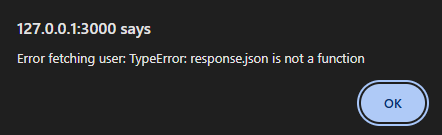
Solution: Use await with fetch() as well
Even though I used await for response.json(), that alone isn’t enough. The fetch() function itself also returns a Promise, so we must use await with it as well.
async function fetchUser() {
  try {
    let response = await fetch('https://jsonplaceholder.typicode.com/users/3'); // ✅ fixed
    let user = await response.json();

    alert(`User name is: ${user.name}`);
  } catch (error) {
    alert(`Error fetching user: ${error}`);
  }
}

fetchUser();
2. Error Handling Problem with isNaN():
Problem: In the below code, I took input using prompt() and used an if condition with isNaN() to check if the user entered a number:
let a = prompt("Enter First Number: ");
let b = prompt("Enter Second Number: ");

if (isNaN(a) || isNaN(b)) {
    throw SyntaxError("Sorry!!! Please enter a number");
}

let sum = parseInt(a) + parseInt(b);
alert(`The sum is: ${sum}`);
console.log("The sum is:", sum);
Even though a and b are strings (because prompt() returns string), isNaN() didn’t throw an error when I typed numbers like 5 or 10. I was confused — I thought it should throw an error since it's a string, not a number.
Solution: Even though prompt() gives input as a string, JavaScript automatically tries to convert the string input into a number before checking if it is NaN (Not-a-Number).
So when I type "5" and "10" into the prompt:
JavaScript sees them as strings.
isNaN("5")becomesisNaN(5)internally, which isfalse.This means the input is valid for numeric use.
However, if I type "hello":
isNaN("hello")becomesisNaN(NaN), which istrue.It triggers the error message, as expected.
And we use parseInt(a) + parseInt(b) to convert those string numbers into actual numbers before adding. Otherwise, "5" + "10" would give "510" (string join), instead of 15.
3. Use of finally clause in JavaScript:
Problem: While learning about error handling in JavaScript, I got confused about where and when the finally clause is needed.
In the below code, the message "Closing files..." doesn’t show up, even though it’s placed right after return. That’s because any code present after a return keyword inside a function doesn’t get executed.
function main() {
    let x = 1;
    try {
        console.log("The sum is:", sum * x);
        return true
    } catch (error) {
        console.log(error);
        return false
    }
    // This code will never run!
    console.log("Closing files...");
}
main()
Solution: Use finally to run code even after return keyword inside a function.
To make sure the final message (like cleaning up resources or closing a database connection) runs no matter what, I moved it inside the finally clause as shown below:
function main() {
    let x = 1;
    try {
        console.log("The sum is:", sum * x);
        return true
    } catch (error) {
        console.log(error);
        return false
    }
    // After return statement in the try & catch block, the message inside finally still runs.
    finally {
        console.log("Files are being closed, along with the database connection");
    }
}
main()
4. JavaScript Class Inheritance Error:
Problem: While learning about JavaScript classes and inheritance, I created a child class that extends a parent class. Inside the child class constructor, I tried to use this. before calling super(), and it gave an error.
class Animal {
    constructor(name) {
        this.name = name;
    }
    makeSound() {
        console.log("Animal makes sound");
    }
}

class Cat extends Animal {
    constructor(name, breed) {
        this.name = name; // ❌ Error here
        this.breed = breed;
    }
    sound(){
        console.log(`${this.name} says Meow!`);
    }
}

const myCat = new Cat ("Snowbell", "Persian");

console.log(myCat.name);
console.log(myCat.breed);
myCat.sound();
myCat.makeSound();
❌ Error Message:
ReferenceError: Must call super constructor in derived class before accessing 'this' or returning from derived constructor
Solution: Always Call super() Before Using this.
To fix this, I learned that in JavaScript, when one class inherits from another using extends, the subclass must call super() first inside its constructor. The super() function calls the constructor of the parent class and sets everything up correctly.
class Animal {
    constructor(name) {
        this.name = name;
    }
    makeSound() {
        console.log("Animal makes sound");
    }
}

class Cat extends Animal {
    constructor(name, breed) {
        super(name) // ✅ Correct Method
        this.breed = breed;
    }
    sound(){
        console.log(`${this.name} says Meow!`);
    }
}

const myCat = new Cat ("Snowbell", "Persian");

console.log(myCat.name);   // Output: Snowbell
console.log(myCat.breed);  // Output: Persian
myCat.sound();             // Output: Snowbell says Meow!
myCat.makeSound();         // Output: Animal makes sound


